Buyer’s guide
Affordable COI Tracking Tools: What Small Contractors Should Look For
Cheap software is easy to find. A tool that actually keeps every subcontractor certificate current, without a five-figure contract, takes more care to choose.
The certificate on file expired in March. Nobody noticed until the framing crew was already on site, the general liability policy had lapsed, and the owner’s risk manager asked for proof of coverage before releasing a progress payment. That sequence — expired certificate, missed renewal, awkward call — is the reason contractors start shopping for an affordable COI tracking tool in the first place.
The difficulty is that certificate of insurance tracking sits in an odd part of the software market. At one end are enterprise risk platforms priced for national contractors with thousands of vendors. At the other end are spreadsheets and calendar reminders. Small and mid-sized general contractors, property managers, and compliance administrators live in between: fifteen to two hundred subcontractors, no dedicated risk department, and real exposure if coverage lapses mid-project.
This guide covers what these tools actually do, how to judge whether one is genuinely affordable for your operation, which features earn their place, and when a spreadsheet is still the right call.
What Is a COI Tracking Tool?
A COI tracking tool is a system of record for the insurance documents your subcontractors and vendors are contractually required to carry. Instead of a folder of PDFs and a spreadsheet of dates, the certificates, their coverage details, and their compliance status live in one place. The core jobs:
- Collection. Requests go out to the subcontractor or their agent, who uploads the certificate directly rather than emailing it to a project manager.
- Storage. Every ACORD form, endorsement, and W-9 is filed against the vendor record and retrievable during an audit or a claim.
- Expiration tracking. Policy effective and expiration dates are read from the certificate and monitored automatically.
- Renewal reminders. Scheduled emails chase the vendor before the lapse rather than after it.
- Vendor management. Each subcontractor has a profile showing which documents are on file, which are missing, and which projects they touch.
- Compliance status. Requirements — $1M/$2M general liability, additive insured wording, waiver of subrogation — are compared against what the certificate shows, producing a compliant or non-compliant flag.
- Verification workflow. Someone, or something, checks that the document matches the requirement before the vendor is cleared to work.
The last two are where products diverge most. Reading a date off a certificate is easy. Confirming that the CG 20 10 and CG 20 37 endorsements are attached, that the policy is primary and non-contributory, and that your entity is named correctly is the part that catches real exposure — and the part cheaper tools most often skip.
What Makes a COI Tracking Tool Affordable?
The advertised monthly price is the least useful number in this market. Two products at the same headline rate can differ by thousands of dollars a year once vendor counts, seats, and setup are accounted for. Affordability is the total cost of keeping your actual vendor list compliant for twelve months.
Things that quietly move the real number:
| Cost factor | What to check | Why it matters |
|---|---|---|
| Pricing model | Flat plan, per vendor, or per seat | Per-vendor pricing scales badly for GCs with churn between jobs |
| Vendor limits | Cap per tier and cost of the next tier | One busy quarter can push you into a plan that doubles in price |
| User seats | Included seats vs. per-user fees | PMs, accounting, and admin all need access; single-seat plans stall |
| Document or page limits | Storage caps, OCR pages per month | Endorsement schedules run long and burn page allowances fast |
| Setup and implementation | Onboarding fees, data migration, required training | Four-figure setup charges are common on full-service platforms |
| Contract terms | Monthly vs. annual lock-in, auto-renewal, notice period | Annual contracts remove your leverage if the tool underperforms |
| Add-ons | Integrations, extra workspaces, reporting modules | Features shown in the demo are sometimes priced separately |
| Data access | Export format and cost of leaving | If you cannot export certificates and dates, switching later gets expensive |
Before you compare quotes, calculate three things: your peak vendor count over the last twelve months (not today’s count), the number of people who need to log in, and the hours your team currently spends chasing certificates each month. Multiply the third by a loaded hourly rate. That figure is the budget the software has to beat — and for many small contractors it is larger than the subscription itself.
Self-service tools with published prices are worth prioritizing for one practical reason: you can do this math without a sales call. SubDoc, for example, lists its tiers openly — a free tier for a small number of vendors, a mid tier around $20 per month covering up to 100 vendors and 10 seats, and an unlimited-vendor tier around $55 per month; you can view SubDoc pricing directly rather than requesting a quote. Treat published pricing as a filter: vendors who hide numbers behind a form are usually priced for a larger buyer than you.
Features Small Contractors Actually Need
Feature lists in this category are long and largely interchangeable. In practice, a small contractor’s outcome depends on a short list.
Essential
- Automated expiration tracking and reminders. The single feature that justifies the purchase. Confirm reminders go to the subcontractor and their agent, not only to your inbox.
- Vendor-side certificate collection. A link the sub or their broker can upload through. If your team still has to save attachments manually, you have bought a filing cabinet.
- Policy data extraction. Coverage limits and dates pulled from the ACORD form automatically. Manual data entry is where most tracking systems quietly die.
- Compliance status against your requirements. Configurable minimums per trade — a roofer and an office cleaner should not share a requirement set.
- Centralized document storage with search. Retrieving a two-year-old certificate during a claim should take seconds.
- Export. CSV or Excel output of vendors, statuses, and expiration dates, for owners, auditors, and your own carrier.
Nice to have
- Endorsement-level verification. Genuinely valuable, but often the difference between a self-service price and a full-service one. Decide whether your contracts require it.
- Accounting or PM integrations. Useful at scale; rarely the deciding factor under 50 subs.
- Project-level grouping and workspaces. Matters if you run several jobs with overlapping subs.
- Branded vendor portals, mobile apps, dashboards for owners. Pleasant. Not why coverage lapses.
One test cuts through most sales demos: ask the vendor to walk through what happens on the day a subcontractor’s policy expires and nobody logs in. The answer tells you whether the product works on its own or only when someone remembers to check it.
COI Tracking Software vs. Excel and Google Sheets
Spreadsheets are not a joke solution. They are free, flexible, and every project manager can already use one. They fail on a specific axis: they are passive. Nothing happens unless a person opens the file.
| Factor | Excel / Google Sheets | COI tracking software |
|---|---|---|
| Upfront cost | None | None to moderate; setup fees on some platforms |
| Recurring cost | Staff time only | Subscription, typically tied to vendor count |
| Manual work | High — every date typed by hand | Low once requirements are configured |
| Expiration reminders | Manual calendar entries; easy to miss | Automatic, usually multi-stage |
| Document organization | Separate folder tree, links break | Certificates attached to vendor records |
| Compliance visibility | Whatever the last editor typed | Status calculated from the document |
| Human error | Typos, stale rows, overwritten cells | Reduced, though extraction still needs review |
| Renewal follow-up | Someone has to write the email | Automated, with an audit trail |
| Scalability | Breaks down past roughly 15–20 vendors | Handles hundreds without added headcount |
A spreadsheet is defensible when you work with a stable handful of long-term subs, one person owns the list, and your contracts do not demand endorsement-level proof. Move to dedicated software when vendor turnover picks up, when more than one person needs the current status, when an owner or lender starts requesting compliance reports, or the first time an expired certificate reaches a job site.
How to Choose an Affordable COI Tracking Tool
Work through this checklist against every shortlisted product. It takes an afternoon and prevents the two common outcomes: overpaying for an enterprise platform, or buying something cheap that your team abandons in six weeks.
- Pricing model. Flat, per vendor, or per seat — and which one matches how your vendor list behaves.
- Vendor limits. The cap on your tier, and the price of the tier above.
- User limits. Seats included; cost per additional user.
- Document limits. Storage, monthly uploads, OCR page allowances.
- Expiration reminders. Timing, recipients, and whether the schedule is configurable.
- Certificate collection. Can agents upload without an account?
- Verification workflow. Automated checks, human review, or your own eyes.
- Implementation. Realistic time from signup to first tracked vendor.
- Reporting and export. Can you hand an owner a compliance report today?
- Support. Channel, hours, and whether it is included at your tier.
- Contract terms. Monthly cancellation or annual commitment.
- Data access. Bulk export of certificates and records if you leave.
Questions worth asking a vendor
- What exactly happens on the day a policy expires if nobody logs in?
- What is the all-in first-year cost for my vendor count and seat count?
- Is coverage-limit and endorsement checking automated, manual, or my job?
- What happens when I exceed my vendor limit mid-month?
- Can I export every certificate and every date, and in what format?
- How long does a typical customer of my size take to go live?
Affordable COI Tracking Tools Worth Considering
The market splits into three groups, and knowing which group you are shopping in matters more than any single product name. Pricing below reflects publicly listed rates at the time of writing; verify current figures before you buy, since these plans change often.
Full-service risk platforms
myCOI, Jones, and Evident are the names contractors encounter most at this level. They combine software with human review teams that chase agents and verify endorsement language. The positioning is risk transfer rather than convenience, and they suit contractors whose contracts carry heavy insurance requirements or whose owners audit compliance. Pricing is quoted rather than published, and generally involves annual commitments — which puts most of them outside what a small contractor would call affordable.
Self-service tracking tools
This is the group that actually competes for the “affordable COI tracking tool” search. Products such as COI Tracker, COISoftware, and CertShield publish their prices and let you sign up without a demo. COI Tracker lists a free tier covering 10 vendors with plans from $29 per month; COISoftware prices by AI extraction volume with a Starter plan listed at $49 per month; CertShield lists service starting at $99 per month with human-checked documents. Strengths: fast setup, no contract, transparent math. Limitations: vendor caps arrive quickly, and the depth of endorsement verification varies significantly between them.
Construction-first compliance tools
A smaller set of products is built specifically around subcontractor compliance rather than general vendor management — requirement sets per trade, project grouping, and document types beyond insurance, such as licenses and W-9s. SubDoc sits in this group. For general contractors, the fit tends to be better than a generic vendor tool because the data model matches how jobs are actually run.
Two categories deliberately not on this list: general document management software, which stores certificates without understanding them, and broker-provided tracking portals, which are usually free but tie your compliance data to your insurance relationship.
SubDoc as an Affordable COI Tracking Option
Among the self-service options aimed at contractors, SubDoc is built specifically around subcontractor and vendor compliance rather than general document storage. Certificates are collected from vendors through upload requests, policy data is extracted from ACORD forms automatically, expiration dates are tracked against each vendor record, and renewal reminders go out on a schedule rather than whenever someone opens a spreadsheet. Compliance records — insurance certificates, business licenses, and other required documents — are held centrally so a vendor’s status can be checked or produced for an audit without hunting through email.
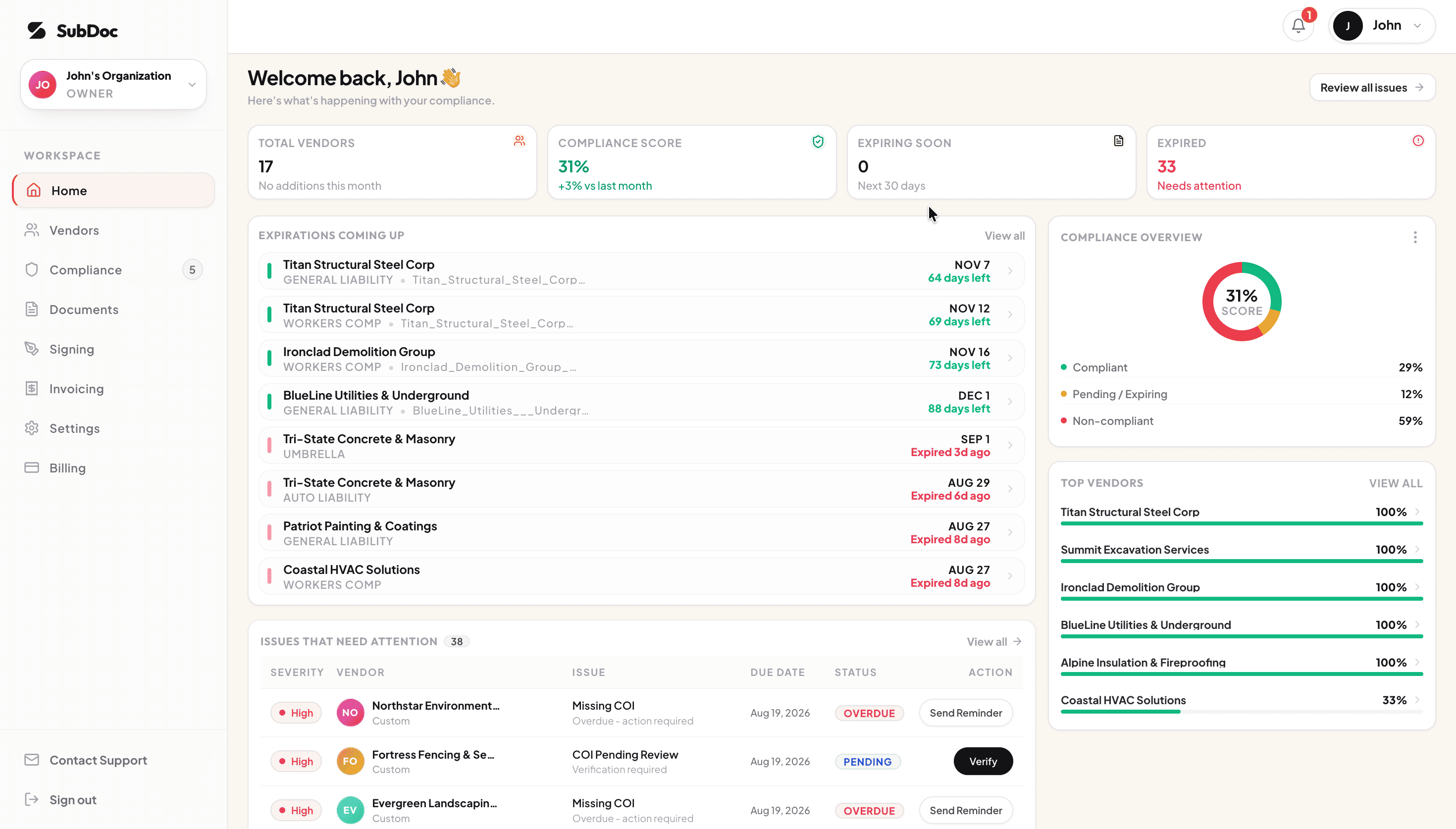
On cost, the relevant detail for a small contractor is structure rather than headline price: the published plans scale on vendor count, workspaces, and seats, with a free tier for testing on a real vendor list and mid tiers that include multiple team seats — which avoids the single-seat trap that catches buyers on some cheaper tools. As with any vendor on your shortlist, run your own peak vendor count and seat requirement through the current plan limits before committing, and confirm that its verification depth matches what your contracts demand.
Frequently Asked Questions
What is the cheapest way to track certificates of insurance?
A shared spreadsheet plus calendar reminders costs nothing but your time. Several COI platforms also offer free tiers covering a small number of vendors, which is often cheaper in practice than the hours a spreadsheet consumes once you pass roughly 15 to 20 subcontractors.
Is COI tracking software worth it for a small contractor?
It usually pays for itself once tracking takes more than two or three hours a month, or once a single uninsured subcontractor could trigger a claim, a stop-work order, or a failed audit. Below that threshold, a disciplined spreadsheet is defensible.
Can I use Excel to track certificates of insurance?
Yes. It works for a stable list of under about 15 subcontractors with one clear owner. Excel will not chase renewals, read endorsements, or store the certificates themselves, so the manual workload grows faster than the vendor list does.
What should an affordable COI tracking tool include?
At minimum: automated expiration tracking, renewal reminders sent to the vendor, vendor-side certificate upload, automatic extraction of dates and coverage limits, a compliance status against your own requirements, searchable storage, and CSV export.
How much does COI tracking software cost?
Self-service tools commonly publish entry plans between roughly $20 and $100 per month, with vendor count as the main pricing lever. Full-service platforms with human verification teams are quoted individually, usually annually, and cost considerably more. Always confirm current pricing directly with the vendor.
Is SubDoc suitable for small contractors?
It is aimed at contractors managing subcontractor compliance, publishes its plans openly, and offers a free tier for a small number of vendors, so it can be evaluated on a real vendor list before spending anything. Whether it fits depends on your vendor count, seat count, and how strict your contract insurance requirements are.
The Bottom Line
Affordability in this category is decided by three numbers: your peak vendor count, the number of people who need access, and the hours your team currently loses to chasing certificates. Price the shortlist against those, insist on published or itemized pricing, and test any tool on a real vendor list before committing to a year. A tool that reliably emails a subcontractor thirty days before their policy lapses is worth more than a platform with a longer feature list that nobody on your team opens.